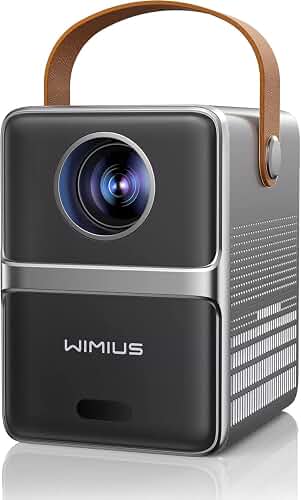
The best projector for college dorm room living with shared quiet hours rules is a compact 1080p or 4K model under 26 dB fan noise that supports Bluetooth headphone output, runs on USB-C or a single power brick, and throws a 80 to 100 inch image from roughly 8 to 10 feet away. Quiet hours typically run from 10 p.m. to 8 a.m. on most campuses, so audio that routes silently to your earbuds matters far more than wattage in built-in speakers. Add keystone correction for off-center desks, an HDMI input for a console, and a screen mode that works on a bare beige wall, and you have the dorm rig that survives an entire academic year.
This 2026 buyer's guide walks through every spec that actually matters when your viewing room is a 12 by 14 cinder block box you share with another human who needs to sleep at 11 p.m. We will skip the marketing language and focus on noise, brightness, throw distance, headphone latency, and the one or two cables that keep your setup from violating fire-code rules about hanging things from sprinklers.
The best best projector for college dorm room for your situation depends on how you plan to use it and where.
Why dorm rooms break normal projector advice
Most home theater guides assume you have a dedicated room, blackout curtains, and neighbors on the other side of drywall. Dorms break every assumption. Your room is shared, your roommate's sleep schedule is not yours, the walls are often painted gloss white or beige, the ceilings are 8 feet of acoustic tile you cannot drill into, and your RA can write you up for adhesive damage or for noise audible in the hallway after quiet hours begin.
The best projector for college dorm room use therefore optimizes for three constraints normal buyer guides ignore. First, fan noise under 26 decibels in eco mode, because anything louder will be audible across the room at 1 a.m. Second, a clean audio path to wireless headphones with low enough latency that movie dialogue still syncs to lip movement. Third, a footprint small enough to live on a desk shelf or stack on top of a mini fridge without permanent installation. Skip those three and you will end up returning the projector by midterms.
Fan noise: the spec nobody publishes honestly
Manufacturers list fan noise in eco mode at the quietest possible setting with the projector running a black slide. Real-world noise during a Marvel film is typically 4 to 8 decibels higher. For a dorm, target a published spec of 24 to 26 dB or lower. Pico and LED-based projectors are almost always quieter than lamp-based DLP models because they run cooler. Laser light engines are also quiet but tend to live in larger chassis. If you can audition a unit in a store or borrow from a friend, listen for high-frequency whine in addition to broadband fan hum, because the whine is what wakes a sleeping roommate.
Brightness and the bare-wall problem
Dorm rooms are not movie caves. You will watch with the desk lamp on, the hallway light leaking under the door, and a roommate's monitor glowing. You also probably cannot install a real projection screen. That pushes the lumens spec higher than a typical living room recommendation. Look for 500 to 1000 ANSI lumens for a portable LED unit and 2000 to 2800 ANSI lumens for a desk-mounted lamp or laser model.
On a bare beige or off-white wall, expect to lose roughly 20 percent of perceived contrast versus a matte white screen. A cheap fix is a 100 inch pull-up or wall-mounted screen that rolls down with a string mechanism, but if your RA bans wall-mounted hardware, a $30 portable screen on a stand at the foot of your bed works. For more on matching brightness to your viewing conditions, see our projector lumens guide and the deeper breakdown in how many lumens you actually need for home theater.
Throw distance in a 12 by 14 room
A typical double-occupancy dorm is between 11 and 16 feet long. That sets a hard ceiling on your image size unless you buy short-throw or ultra-short-throw. A standard throw projector with a 1.2:1 ratio placed 10 feet from the wall renders roughly a 96 inch image. A short-throw model at a 0.5:1 ratio placed 4 feet away gives you the same picture and lets you sit closer to the wall, which is great when your bed is the couch. Ultra-short-throw is usually overkill for dorm budgets and overlap with mini fridge placement.
Use a throw calculator before you buy. Our projector throw distance guide walks through the math for common dorm layouts, and the broader home theater projector buying guide covers the trade-offs between throw ratio, brightness, and price.
Quiet hours and the wireless audio path
Most campus housing has a written quiet hours policy running from 10 p.m. or 11 p.m. through 8 a.m. or 10 a.m., with 24-hour courtesy hours layered on top. Audible movie audio after quiet hours starts is a documentation risk, even if you are using a soundbar at low volume. The realistic solution is Bluetooth headphones or earbuds, and that is where projector selection gets specific.
Look for projectors that support Bluetooth 5.0 or newer, with aptX Low Latency or aptX Adaptive codec support. Standard Bluetooth audio adds 150 to 250 milliseconds of latency, which is enough to make lip sync look wrong on dialogue scenes. Low-latency codecs cut that to 40 to 80 ms, which most people cannot detect. If the projector only supports basic SBC Bluetooth, you will need a 3.5 mm wired connection to a small headphone amp instead, which works fine but adds clutter.
Some Android TV based projectors route Bluetooth audio only through the streaming app, not through HDMI inputs, which means a console plugged in by HDMI cannot send audio to your headphones. If you plan to game on a Switch or PS5 in your dorm, verify this before you buy or budget for a separate Bluetooth transmitter that plugs into the projector's analog audio out.
Speakers, soundbars, and the courtesy hours window
Before quiet hours kick in, you may want actual speakers. Built-in projector speakers are mostly disappointing in the 3 to 8 watt range. A small soundbar under your desk, kept at conversational volume, is roommate-friendly during evening hours. Our walkthrough on connecting a soundbar to a projector covers the HDMI ARC versus optical versus 3.5 mm trade-offs. If you eventually move off-campus, the same hardware migrates into a real living room, so a $120 soundbar is not wasted money.
Mounting without losing your housing deposit
You cannot drill into the ceiling. You probably cannot use heavy adhesive strips on painted concrete block. The realistic dorm mounting options are: place the projector on a desk shelf at the foot of your bed, use a small tripod that lives on top of a dresser, or buy a clamp-mount that grabs the edge of a desk and swings the projector over the work surface. Any of these work because dorm projectors are typically under 6 pounds.
If you do live in housing that allows ceiling mounts (some upperclassman apartments do), our guide to mounting a projector to the ceiling covers anchor selection and cable routing, though for a 9 month lease it is rarely worth it.
Connectivity for the modern dorm life
Your projector needs to display content from a laptop (HDMI or USB-C with DisplayPort alt mode), a phone (AirPlay or Miracast or a Lightning/USB-C adapter), a streaming stick (Fire TV, Roku, Chromecast), and possibly a console. That is more than the average home theater setup juggles. Prioritize models with at least two HDMI inputs and built-in Wi-Fi 5 or Wi-Fi 6. Built-in streaming via Android TV or Google TV saves a stick and an HDMI port, but verify that the streaming services you use (especially Netflix and Hulu) are properly licensed on that platform. Some cheaper dorm projectors run a sideloaded Netflix that breaks every few months.
Picking by use case
If you mostly stream Netflix and YouTube
Buy a portable LED or laser model in the 500 to 800 ANSI lumen range with built-in Google TV. Battery-powered options exist if you also want to use the projector at football tailgates or beach trips. These are typically the quietest dorm options at 22 to 25 dB fan noise. The trade-off is image size: expect a comfortable 70 to 90 inches at dorm distances rather than a true 100+ inch wall fill.
If you game on a console
Prioritize input lag specs under 20 ms in game mode and a true 1080p or 4K native panel. Skip pico projectors here because most use slow LCoS panels with 50+ ms of lag. A 1080p DLP with a brighter lamp will look better at high frame rates and is more forgiving with motion. Pair with wired headphones during quiet hours since wireless adds latency a competitive player will notice.
If you and your roommate watch movies together
You can spend more on image quality because the projector becomes shared infrastructure. A 1080p model with HDR support and a soundbar gets you closer to a real cinema feel during evening hours, with headphones taking over after 10 p.m. A 100 inch image filling the wall opposite both beds turns the room into a passable theater for movie nights. Our roundup of home theater projectors under $1000 includes several models that work in dorm-size rooms.
If you mostly use it for studying and presentations
This is overlooked but real. Projecting your laptop screen onto a wall is genuinely useful for group study, lecture review at 200 percent zoom, or rehearsing slide decks. A bright (2000+ lumen) model with strong text sharpness beats a movie-oriented projector here. Look for a projector with a published contrast ratio above 10,000:1 and avoid units that use heavy frame interpolation, which makes static text shimmer.
Specs to ignore in a dorm context
Marketing pages emphasize 4K resolution, HDR10+, and 3D support. In a dorm, native 1080p is fine because your wall is not flat enough and your seating is too close for 4K to make a visible difference. HDR rarely activates on streaming sticks without HDMI 2.1 negotiation. 3D is dead. Skip projectors that lean heavily on those specs in their pricing and pick a quieter, smaller model instead. Anyone trying to upsell you to a flagship 4K laser unit for a $200 a semester housing assignment is not solving your real problems.
A quick reality check on cost
For dorm use in 2026, expect to spend $250 to $450 on a portable LED projector, $500 to $800 on a 1080p DLP with decent brightness, and $900 to $1300 on a 4K-capable model with quiet operation. The portable LED tier is honestly where most students should shop because it lines up with quiet hour constraints and the reality that you are moving in and out of housing every nine months.
Frequently Asked Questions
How quiet does a projector need to be for college dorm quiet hours?
Aim for a published fan noise spec of 26 dB or lower in eco mode. Anything from 27 to 32 dB is audible across a small dorm room when the rest of the building is quiet. Real-world fan noise during bright scenes is typically 4 to 8 dB higher than the published eco-mode number, so a 24 dB spec is a safer target than 26 dB if your roommate is a light sleeper.
Can I project onto a bare dorm wall or do I need a screen?
You can project onto a bare wall, but image quality drops noticeably on textured paint, beige tones, or glossy finishes. A $30 to $80 portable screen on a stand recovers most of that quality without violating dorm rules about wall hardware. Cinder block walls in particular eat contrast because of micro-shadows in the texture, so a screen is worth it even on a budget.
What is the best projector setup for a small dorm with limited throw distance?
A short-throw projector with a throw ratio between 0.5:1 and 0.8:1 placed on a desk or shelf 4 to 6 feet from the wall produces a 90 to 100 inch image without needing the full length of the room. Pair it with a portable screen at the foot of the bed and route audio over Bluetooth headphones during quiet hours.
Are Bluetooth headphones synced well enough for movies on a projector?
Only if both the projector and the headphones support a low-latency Bluetooth codec like aptX Low Latency or aptX Adaptive. Basic Bluetooth adds 150 to 250 ms of latency, which is visible as lip-sync drift on dialogue scenes. AirPods using Apple's proprietary low-latency mode also work well when paired with an iPhone streaming to the projector via AirPlay. For wired alternatives, a 3.5 mm output to a USB DAC or amp eliminates the latency question entirely.
Will my dorm RA write me up for using a projector?
The projector itself is almost never the issue. Documentation usually happens because of three things: audible audio after quiet hours, fire-code violations from hanging items off sprinklers or ceiling tiles, or adhesive damage when you move out. Use headphones after 10 p.m., keep mounting on furniture rather than walls or ceilings, and you will not get written up for the projector.
Should I buy a portable mini projector or a larger desk model for a dorm?
Portable mini projectors win on noise, weight, and storage. Larger desk models win on brightness and image quality. If your roommate sleeps early and you watch a lot of late-night content, the portable wins. If you host movie nights and want the room to feel like a real theater during evening hours, the desk model wins. Our roundup of portable mini projectors for home theater covers the strongest 2026 options.
What happens to the projector when I move home for summer?
Portable models fit in a backpack and survive checked luggage in original packaging. Larger 1080p and 4K DLP units need a hard case or the original box because the optical engine is sensitive to drops. Plan storage at home before you buy, and pull the lamp filter every 200 hours of use to keep dust out during transport. Our cleaning and maintenance walkthrough covers filter access for the most common dorm-grade models.
Key Takeaways
- Choosing the right best projector for college dorm room means matching the key features to your specific needs and budget
- Read real customer reviews and check the return policy before you commit
- Also covers: dorm room projector quiet fan
- Also covers: shared room projector roommate friendly
- Also covers: compact projector dorm desk
- Compare value across models — the priciest option is not always the best fit