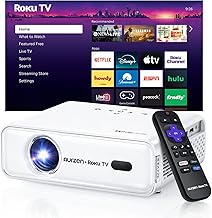
Finding the best projector with built in netflix native support is harder than it should be. Most "smart" projectors ship with Android TV or a generic Linux OS that blocks the official Netflix app, quietly forcing you to plug in a Fire TV Stick, Roku, or Chromecast dongle. Only a small group of projectors in 2026 have negotiated direct Netflix licensing—meaning the app loads, signs in, and streams in HD or 4K without any external hardware hanging off the HDMI port. This guide explains why native Netflix is rare on projectors, which platforms genuinely have it, and how to verify a model before you buy.
Why "smart projector" rarely means "Netflix works"
Almost every projector marketed as smart in 2026 runs one of four operating systems: Google's Android TV (or its lighter cousin Google TV), Android AOSP (an unlicensed fork), a vendor Linux build, or a TV-grade OS like Tizen, webOS, or Vidaa. Netflix only ships its official app to platforms that pass Netflix's certification program. That program covers DRM (Widevine L1 for HD/4K), HDCP, audio passthrough, the remote-control input layer, and a long list of UX requirements.
The best best projector with built in netflix native for your situation depends on how you plan to use it and where.
Projector makers usually skip certification for two reasons. First, the engineering cost is significant for a niche product. Second, many projectors use chipsets—particularly the Mediatek MT9 and Amlogic T series—that ship without the Widevine L1 keys Netflix demands for high-resolution playback. Without those keys, the app either refuses to install or downgrades to a low-resolution stream that looks dreadful on a 100-inch screen. That is why the vast majority of "Android TV projectors" still tell you to install Netflix via a workaround or recommend an external dongle in the manual.
What native Netflix actually looks like on a projector
Before you trust a product listing, here is what genuine native support looks like in practice. You open the projector's home screen out of the box. The official red-N Netflix tile is pre-installed, or it appears in the platform's app store under the same publisher ("Netflix, Inc."). You sign in with your normal credentials, your profile and continue-watching list sync, the remote has a real Netflix button, and the playback info card shows 1080p or 4K with HDR if the panel supports it. There is no APK sideload, no "Desktop Launcher" trick, and no warning that the app may stop working after the next update.
If a seller's listing avoids the word "native" and instead says "supports Netflix via app store" or "Netflix compatible," treat that as a yellow flag. Both phrases are technically true even when you have to sideload. The home theater projector buying guide has a full checklist for vetting smart-platform claims before purchase.
Platforms in 2026 that actually run Netflix natively
If a dongle-free Netflix experience is your priority, your shopping list narrows to a handful of operating systems rather than specific models. Here is the realistic landscape for the best projector with built in netflix native playback right now.
Vidaa U (Hisense Laser Cinema / Laser TV)
Hisense's ultra-short-throw laser projectors run Vidaa U, the same OS used on the company's TVs. Netflix is preinstalled, certified for 4K HDR, and the included remote has a dedicated Netflix button. The PX3-Pro and L-series cabinets are the most common picks here, and they avoid the certification gap because Hisense treats the projector exactly like a smart TV from a software standpoint. If you want the deep dive on one of the headline models, see our Hisense PX3-Pro review.
Tizen (Samsung The Premiere)
Samsung's The Premiere family of triple-laser USTs runs Tizen, the same platform as Samsung's flagship QLEDs. Netflix, Disney+, Max, and Apple TV+ are all genuinely native, sign-in syncs to your Samsung account, and 4K HDR streams play at full resolution. Tizen is arguably the most polished smart layer on any projector in 2026 because Samsung amortizes development across millions of TVs.
FengOS / Formovie Theater (select Formovie / Fengmi models)
Formovie's flagship Theater and S5 lines ship with FengOS in the U.S. market, which has been Netflix-certified through a licensing partnership rather than via Android TV. The presentation looks slightly different from the standard Netflix UI but the app is the real thing, signed by Netflix, with 4K HDR and Dolby Vision on supported models.
LG webOS (limited projector lineup)
LG's CineBeam HU915QE and the newer Q-series 4K laser projectors run webOS with native Netflix, Disney+, and Apple TV+. The catalog of webOS projectors is smaller than the TV catalog, but if you can find one in stock the Netflix experience is identical to an LG OLED.
Android TV / Google TV (case by case)
This is where buyers get burned. Some Android TV projectors—notably a few XGIMI and BenQ models—ship with Netflix preloaded after Google certification. Others run un-certified Android and require a sideload. The only way to be certain is to confirm Netflix appears inside the Google Play Store on that exact model number, not just "Android TV is supported." Our XGIMI Horizon Ultra review walks through how that model handles streaming in detail.
Operating systems to avoid if Netflix matters
Any projector that markets itself as running "Android 9.0" or "Android 11" without mentioning Google TV, Android TV, or Play Store certification is using AOSP. That means no Play Store, no Widevine L1, and no native Netflix. You will find these phrases in the listings for most sub-$500 portable projectors. They are great for casting, sideloading Kodi, or running Plex from a NAS, but Netflix at anything above 480p is not on the menu.
Similarly, projectors that list "Aptoide TV" or a generic "App Market" as their store are not certified. Aptoide is a third-party APK repository, not a Netflix distribution channel. Even when the app installs from there, it typically refuses to play protected content or maxes out at standard definition.
How to verify before you click buy
Three concrete checks will save you a return.
1. Read the spec sheet for "Widevine L1." If the projector explicitly lists Widevine L1, it can legally and technically decode protected HD/4K Netflix streams. L3 means software-only DRM and is capped at 480p in the Netflix app even when it installs.
2. Search the manufacturer's support site for "Netflix." If the brand has nothing to say, that itself is a signal. Brands with native Netflix tend to advertise it loudly because they know buyers want it.
3. Check current owners on forums. AVS Forum threads and Reddit's r/projectors are full of buyers comparing notes by firmware version. A model that had native Netflix at launch sometimes loses it after a firmware update, and vice versa.
What to prioritize beyond the streaming app
Native Netflix is a convenience feature, not a picture-quality feature. Once you have shortlisted models with the right OS, judge them like any other home theater projector: brightness for your room, contrast for dark scenes, motion handling, and throw distance for your screen size. Our best laser projectors for home theater roundup and our best 4K home theater projectors guide both filter models by image quality first, then note which run a Netflix-friendly OS.
One pitfall worth flagging: a projector with native Netflix but only 1500 ISO lumens may give you a wonderful streaming UI and a washed-out image in anything brighter than a fully blacked-out room. Match brightness to your environment first, then prioritize the streaming layer. If you are still calibrating expectations, the projector lumens guide explains how vendor brightness claims map to what you will actually see on a screen.
If your dream projector doesn't have native Netflix
Most enthusiast-grade home theater projectors—Sony, JVC, Epson's higher-end LS models, BenQ's HT-series cinema projectors—deliberately do not bundle smart platforms. The reasoning is straightforward: streaming apps age out within a few years, but a $3,000+ projector lasts a decade. Pairing one with a dedicated streamer (Apple TV 4K, Nvidia Shield, Roku Ultra, or a current Fire TV Stick 4K Max) is the standard pro recommendation. You get the best image processing the projector can deliver, plus a Netflix app that will keep receiving updates long after any built-in OS goes stale.
This combination also sidesteps an annoying side effect of native Netflix: many built-in apps cap audio passthrough at stereo or basic 5.1, blocking Dolby Atmos. A dedicated streamer connected through your AV receiver typically delivers the full audio bitstream. If you are running a surround setup, the notes in how to connect surround sound to a projector apply doubly when the streaming source is built in.
Frequently Asked Questions
Why does my projector say it supports Netflix but only streams in 480p?
That projector almost certainly has Widevine L3 DRM rather than L1. Netflix detects the lower DRM tier and intentionally caps the stream to standard definition to protect the rights holders. There is no firmware fix from the projector side—Widevine L1 keys must be issued by Google at the chipset manufacturing stage. The practical fix is to add an external streaming stick that has its own L1 certification.
Can I sideload the Netflix APK on an Android projector and get 4K?
You can sideload the APK, but the app will still query the underlying DRM stack. Without Widevine L1 on the chip, the sideloaded app behaves exactly like the certified one: low resolution or a black screen on protected titles. Sideloading only helps if the projector had native support that was removed by an OS update, which is rare.
Do Hisense Laser TVs need an external streamer for Netflix?
No. Hisense Laser TVs and ultra-short-throw projectors that run Vidaa U have native, certified Netflix in 4K HDR, with a Netflix button on the remote. They are the closest thing to a true plug-and-play native Netflix projector in 2026.
Does the XGIMI Horizon Ultra have native Netflix without any tricks?
The Horizon Ultra runs Android TV with Google Play certification, and Netflix is available through the Play Store. XGIMI's earlier models required a sideloaded build called "Desktop Launcher" to access it. Confirm the listing references Google TV or the Play Store directly, and verify with the seller that your unit ships with the current firmware before buying.
Is there a portable projector with built-in Netflix that actually works?
Yes, but the list is short. The Anker Nebula Capsule 3 Laser is certified for Netflix on Google TV. Most other pocket-sized projectors run AOSP without Google services and will not run Netflix above 480p. Brightness is the bigger limitation here—most portables top out around 200–400 ANSI lumens, which only looks acceptable in a fully dark room.
Will adding a Fire TV Stick or Apple TV give me a better picture than built-in Netflix?
Often, yes. External streamers have more powerful video decoders, more recent codec support (AV1 is now widely required for higher Netflix tiers), and better audio passthrough. If your projector supports HDMI eARC or you route the streamer through an AVR, you also unlock Dolby Atmos that many built-in apps cannot deliver. The built-in app wins on convenience; the external streamer wins on capability.
Does native Netflix on a projector support Dolby Vision or just HDR10?
Dolby Vision support is rare on projectors of any kind because the format requires per-frame metadata processing that adds licensing and silicon cost. Formovie Theater and a couple of Hisense models support Dolby Vision through their native Netflix apps. Samsung's projectors do not support Dolby Vision at all (Samsung uses HDR10+ instead). For an HDR primer in the projector context, see improve projector picture quality.
Key Takeaways
- Choosing the right best projector with built in netflix native means matching the key features to your specific needs and budget
- Read real customer reviews and check the return policy before you commit
- Also covers: projector native netflix app no dongle
- Also covers: licensed netflix projector built in streaming
- Also covers: smart projector netflix preinstalled official
- Compare value across models — the priciest option is not always the best fit