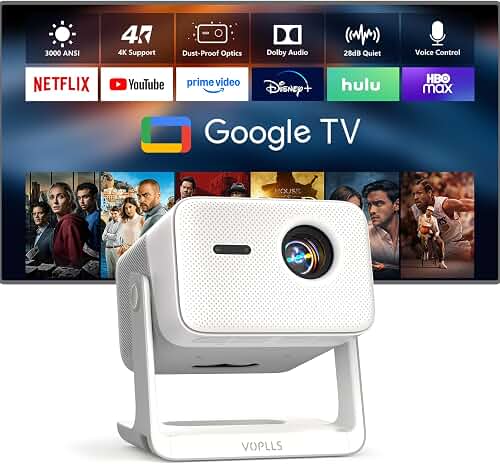
The best projector for Airbnb rental property guest entertainment is one that delivers a memorable, theater-quality experience while being so simple that even non-technical guests can power it on, connect to streaming, and start watching within seconds. For most short-term rental hosts in 2026, that means a 1080p or 4K smart projector with at least 2,500 ANSI lumens, built-in Android TV or Google TV, integrated speakers (or a permanently connected soundbar), automatic keystone correction, and a ceiling-mounted or shelf-secured installation that resists casual tampering. You want guests writing five-star reviews about “the amazing movie setup,” not messaging you at 11 p.m. asking how to switch the input.
This buyer’s guide walks through every consideration that matters when selecting the best projector for Airbnb rental property use, from durability and warranty to streaming convenience, theft deterrence, and how to photograph your setup so guests know what to expect before they book.
Why a projector beats a TV in a vacation rental
A 100-inch projected image is a genuine marketing differentiator. Browse any Airbnb category and you’ll notice the listings that mention a “private cinema,” “movie night setup,” or “projector lounge” tend to command higher nightly rates and longer minimum stays. A 65-inch TV is invisible in listing photos; a glowing 120-inch screen is unforgettable. Projectors also handle group viewing far better, which matters for the family reunions, friend trips, and small corporate retreats that fill mid-week dates.
The trade-off is that projectors require slightly more thought during setup, and the wrong model will generate support tickets. The goal of this guide is to eliminate that risk so the best projector for Airbnb rental property guest entertainment becomes a passive amenity, not an ongoing chore.
Brightness: prioritize ambient-light performance
Guests rarely watch movies in a perfectly blacked-out theater. They’ll fire up the projector at 7 p.m. with the kitchen lights on, blinds half-open, and a lamp glowing in the corner. A projector rated for 1,500 lumens will look washed out in those conditions and guests will assume it’s broken. For short-term rentals, target a minimum of 2,500 ANSI lumens, and 3,000–3,500 ANSI lumens is even better.
Pay attention to the unit of measurement. “LED lumens” and “source lumens” marketing numbers can be three to five times higher than the genuinely useful ANSI lumens spec. If you want a deeper breakdown of how brightness ratings translate to real viewing rooms, our projector lumens guide walks through every scenario.
Laser light sources are particularly compelling for rental properties because the light engine is rated for 20,000–30,000 hours of use, eliminating the lamp replacement that traditional bulbs require every 3,000–5,000 hours. With a steady stream of guests using the unit multiple hours per night, a lamp-based projector might need a $150 bulb annually, while a laser model effectively lasts the lifetime of your hosting business.
Resolution: 1080p is the floor, 4K is the upgrade
In 2026, paying for a 720p projector makes no sense even at the budget end. Native 1080p projectors deliver an entirely respectable image on screens up to 120 inches and are the practical sweet spot for most rentals. If your nightly rate is above $200 and your listing positions itself as a premium getaway, a true 4K projector adds tangible “wow factor” in photos and in person.
Be careful with the wording on listings: “supports 4K input” or “1080p with 4K compatibility” means the chip is 1080p and the unit simply accepts a 4K signal before downscaling. That’s fine for budget rentals but don’t advertise it as 4K in your Airbnb description.
Built-in streaming saves you from input-switching support calls
The single biggest frustration guests report with rental-property projectors is figuring out how to switch from the projector’s home screen to a streaming stick to the host’s game console. Standardize on simplicity: pick a projector with Google TV, Android TV, or a similarly polished smart platform built in, and let guests sign into their own Netflix, Disney+, Hulu, and Max accounts directly on the device.
Google TV and Android TV models also support Chromecast or AirPlay, so guests can mirror their phones for vacation photo slideshows or YouTube videos without learning a new interface. Avoid projectors that ship with obscure off-brand operating systems — they often lack major streaming apps or run outdated, ad-laden versions.
If you’d rather use a dedicated streaming stick (Roku, Apple TV, Fire TV 4K Max), tuck it behind the projector with a velcro strap, hide the remote in a labeled drawer, and tape over the projector’s input button so guests can’t accidentally switch to HDMI 2 and panic.
Auto keystone, autofocus, and short-throw flexibility
Guests are not going to adjust lens shift or fine-tune trapezoidal distortion. Pick a model with automatic keystone correction, autofocus, and ideally automatic screen-fit. These features let a guest pick the projector up off a shelf, set it down on the coffee table, and have a perfectly square image within five seconds.
For tighter rental layouts — studio apartments, ADUs, cabins — a short-throw or ultra-short-throw (UST) projector is worth the premium. A UST sits on a console 10–15 inches from the wall and throws a 100-inch image, eliminating any chance a guest walks through the beam or kicks a cable loose. Our projector throw distance guide covers the measurements you’ll need to match the right throw ratio to your room.
Mounting vs. portable placement for short-term rentals
Hosts generally choose between two installation philosophies for the best projector for Airbnb rental property setup:
- Ceiling-mounted, permanently installed: Looks professional in listing photos, eliminates the risk of damage from a knocked-over unit, and can’t be easily walked off with. Requires power and HDMI runs through the ceiling and a one-time setup investment.
- Shelf or console placement: Cheaper to deploy, allows easy replacement if a unit fails mid-stay, and works well with all-in-one smart projectors. Use heavy-duty velcro or a security cable to discourage walk-offs.
If you go the permanent route, our guide to mounting a projector to the ceiling covers stud finding, cable management, and the small details that separate a professional install from one that creaks every time the upstairs guest walks across the floor.
Theft, damage, and asset protection
A $1,200 projector sitting on a console at a property with a self-check-in lockbox is, statistically, going to walk out the door eventually. Mitigate the risk:
- Ceiling-mount where possible — removing one is conspicuous and time-consuming.
- Use a Kensington security cable through the projector’s lock slot, anchored to a stud.
- Engrave or label the unit with your business name and a serial number.
- Add the projector to your hosting insurance policy or AirCover documentation.
- Photograph the setup at every turnover so you can document its condition.
Avoid keeping the original box visible — it makes theft easier to rationalize. Store it offsite for warranty purposes only.
Audio: built-in speakers are usually not enough
Small built-in projector speakers might suffice for a hotel-style guest room, but a vacation rental positioned around movie nights needs real sound. A modest 2.1 soundbar with HDMI ARC or eARC is the simplest, lowest-maintenance choice. Connect it once, leave it on auto-power, and guests never have to think about it. Our walkthrough on connecting a soundbar to a projector covers ARC, eARC, optical, and Bluetooth options, including the latency pitfalls that can cause lip-sync drift on wireless audio.
If you’re building a true cinema room with a 5.1 or Atmos setup, our surround sound connection guide walks through receiver placement, HDMI routing, and the calibration steps that prevent guest complaints about “the back speakers being too loud.”
Budget tiers: what to expect at each price point
For a one-bedroom rental targeting $150–$250 per night, plan to spend $600–$900 on the projector itself, plus $200–$400 on screen, mounting, and audio. For premium properties charging $400+ nightly, $1,500–$2,500 on the projector is justified by the photographic appeal and lower long-term maintenance of a laser-source 4K unit. Our home theater projector budget guide breaks down the trade-offs at each tier in more detail, and the sub-$1,000 roundup covers the value end where most rental hosts start.
Screen choice: paint, fixed-frame, or bare wall?
A clean, white textured wall actually works fine for casual viewing and saves money. However, a dedicated fixed-frame screen looks dramatically more cinematic in listing photos and produces noticeably better contrast in mixed-light conditions. Ambient-light-rejecting (ALR) screens are worth the premium if your rental has windows the guest can’t fully cover. The screen selection guide goes deeper on gain, material, and aspect ratio for various room types.
Smart-home integration and remote troubleshooting
If you manage the rental remotely, pick a projector with networked control — either built-in Wi-Fi with a manufacturer app, HDMI-CEC for soundbar coordination, or compatibility with a smart plug so you can power-cycle it from afar when a guest reports it “won’t turn on.” A $15 smart plug is the single highest-ROI accessory for a rental projector because remote reboots resolve roughly 80% of midnight support messages.
Setting expectations on the listing
Once you’ve installed the best projector for Airbnb rental property entertainment, advertise it properly. Use phrases that drive search: “120-inch 4K projector,” “in-house cinema,” “movie night setup with streaming.” Photograph the room with the projector running an iconic film still — a sunset landscape or a recognizable franchise shot — and include a clearly written one-page guide in the welcome binder explaining how to power on, switch sources, and adjust volume. A laminated cheat sheet next to the remote prevents 90% of guest confusion.
Need a refresher on a full first-time install before guests arrive? Our home theater projector setup walkthrough covers alignment, focus, and audio sync from unboxing to first movie.
Frequently Asked Questions
What is the best type of projector for an Airbnb rental property?
A 1080p or 4K smart projector with built-in Google TV or Android TV, 2,500+ ANSI lumens, auto keystone, and a laser light source is the best all-around fit. The combination of brightness, longevity, and guest-friendly controls minimizes support requests and maximizes review-worthy moments.
How many lumens should a projector for a vacation rental have?
Aim for at least 2,500 ANSI lumens. Most guests don’t fully blackout the room, so a brighter projector compensates for the lamps, hallway lights, and partial blinds they’ll typically leave on. See the lumens needs explainer for room-by-room benchmarks.
Is a laser projector worth the higher price for a short-term rental?
For most active rentals, yes. Laser projectors run 20,000–30,000 hours without lamp replacement, deliver brighter and more saturated images, and start almost instantly — a meaningful guest-experience improvement over the 60-second warm-up of older lamp units. The laser projector roundup covers the leading options.
Should I mount the projector to the ceiling or leave it portable?
Ceiling-mount whenever possible. It deters theft, prevents accidental damage, looks more professional in photos, and reduces the chance a guest knocks the focus or geometry out of alignment. Portable units only make sense in rentals where you want the flexibility to bring the projector to a backyard movie night.
What streaming setup is easiest for Airbnb guests to use?
Built-in Google TV or Android TV is the easiest because guests sign into their own streaming accounts in 30 seconds and the interface is familiar from their home devices. If the projector lacks a quality smart OS, a tucked-away Apple TV 4K or Fire TV 4K Max with HDMI-CEC is the second-best option.
How do I prevent guests from breaking or stealing the projector?
Combine four tactics: ceiling-mount or shelf-anchor the unit, run a Kensington security cable to a stud, document the setup with photos before every turnover, and add the asset to your hosting insurance. A small framed note explaining “this unit is monitored and insured” is a surprisingly effective psychological deterrent.
Do I need a projector screen, or will the wall work?
A smooth, light-textured white wall works fine for casual viewing and saves $200–$500. A dedicated fixed-frame screen, especially an ambient-light-rejecting model, delivers noticeably better contrast and looks far more impressive in your listing photos — usually worth the upgrade for properties charging premium nightly rates.
What’s the realistic monthly maintenance for a rental projector?
For a laser model, about 10 minutes per turnover: wipe the lens with a microfiber cloth, dust the intake vents, confirm the remote works, and verify streaming logins haven’t been left on a previous guest’s account. Lamp-based units add a $100–$200 bulb every 12–18 months at typical rental usage.
Key Takeaways
- Choosing the right best projector for airbnb rental property means matching the key features to your specific needs and budget
- Read real customer reviews and check the return policy before you commit
- Also covers: airbnb host projector easy guest use
- Also covers: short term rental projector durable setup
- Also covers: vacation rental projector wifi streaming
- Compare value across models — the priciest option is not always the best fit